Monthly Archives January 2012

[Mann.co] Free Community Lottery #2 – Late Christmas Presents!

It is time for the second [Mann.co] Free Community Lottery! But ppsstt, don’t tell. It’s actually the eleventh lottery.

Once again, I’d like to thank the Donators who have donated so far! You’ve been all a big help, and I thank you for this. And before I continue, I want everyone (and really, everyone who wants to join the lottery) to read the following thread:

[Mann Co.] Valuable Lottery Information

&

[Mann Co.] Valuable Lottery Rules

^ READ ABOVE LINKS.. CLICK IT! ^

And view the TF2Raffle link here:
http://tf2r.com/kdzgcld.html

Which shows the time left and how many people have joined so far.

These threads shares all the information and rules you need to know. It’s very important to read it all so hopefully your answers you might have will be answered. By reading above 2 threads, I can assume that you agree to it all when you sign up for this lottery. I’m doing this entirely for free, from both donations and my own backpack, so please; at least make some effort for it. Once you have read both, I’d now like to announce…..

[Mann.co] Free Community Lottery #2
Late Christmas……………. Combo Edition

You can join this lottery through:
[Steam Forums] – [Official TF2Lottery Forums]

Of course, we always start with the hats! Let’s show what you might be able to win, shall we?
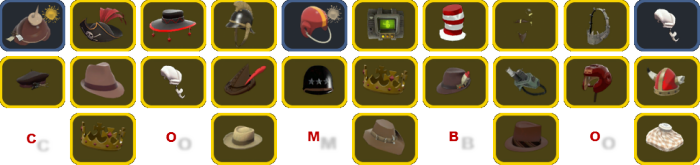
That’s right, combo. There are 10 hats in the first row. See it? See it? Goody! Now let me quickly explain how it works. Let’s say you won the first hat in the first row. Then you’ll get the other hats below it. Won the second hat in the row? Then you also won the hats below it! And so on!… It’s.. that.. simple!

Vintage Weapons Anyone?

Now, in this lottery, I’m going to do it slightly differently.. See these vintage items?
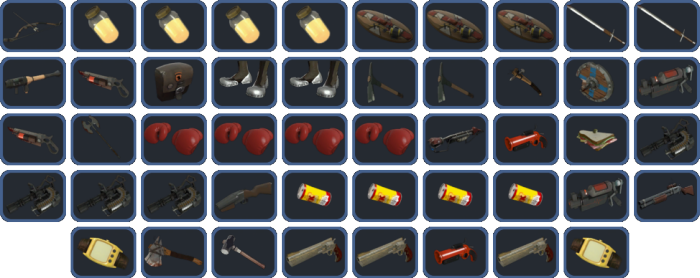

Good, you (one lucky winner) can win them all. That’s right, all vintage items to 1 single person. So in the end, you might be able to win 48 vintage weapons. That should look good in your backpack!

Of course (as always) there’s more! Fancy in a duel?

10x dueling mini-games (worth 50 uses) will also be given to 1 single person. With these babies, you can get your dueling ranking up in no time. Hopefully, you shall win every single duel!

Of course, there’s more.. You thought it ended by now?

These are 2 decal tools, 2 name tags and 1 description tag. You can scratch that the items goes to multiple people, it’ll all go to 1 lucky winner. And yes, that might by you…

Of course we haven’t forgotten a few strange weapons either! What’s a lottery without some extra items?

That’s right, also to 1 single winner!

Last but not least

Guess? What? Yes! Also to 1 person!

In this lottery, you shall not win just 1 item! If you win, you shall win the combo!


How do you join? Well, that’s easy! The only thing that you have to post is your SteamREP information, with as example:

steamID: Skyrider
steamID32: STEAM_0:0:11715230
steamID64: http://steamcommunity.com/profiles/76561197983696188
customURL: http://steamcommunity.com/id/Skyrider
steamrepURL: http://www.steamrep.com/index.php?id=76561197983696188

That’s it!

You can gain the information by going to SteamREP, searching your own information and click the “copy info” at the right side of the page to paste it within the forum posts. But ONLY join in 1 FORUM. So don’t join on the steam forums & the TF2Lottery forums.

Good luck to you all.

Read More
[Mann Co] TF2 Item Spreadsheet

Read More

[Mann Co.] Trade Server – Admin Applications

All Admin Applications / Request goes to the TF2Lottery Forums:

http://forum.tf2lottery.com/admin-applications-f22/

Read More

[Mann Co] Trade Server Monoculus

Guess what? This Trade Server spawns the:

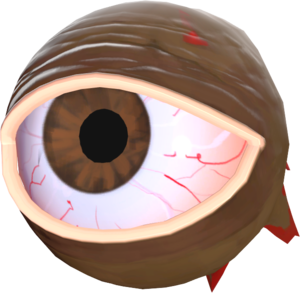
That’s right, the Monoculus! Also known as the Eye Boss. Added in the last TF2 Halloween update of 2011.

Each 12 minutes, the Monoculus will spawn alongside with it’s portal to get there. You might say, portal?

That portal. Once it spawns, go check the bridge outside of the Stock Market, but do it quickly!
But beware! The portal only stays open for a limited time. Once you’ve entered the portal, you’ll be
teleported to an arena. Specially made for the Monoculus.

Read More

[Mann Co.] Trade Server Rules

It’s always important to follow the server rules. By not following the rules, you’ll have the chance
of being kicked and or banned from the server. Remember folks, this is a trade server, not some kind
of kill server unless told otherwise by the admin(s).

-=Blu Players=-
Blu players are usually admins which have the ability to join the BLU team. Do NOT kill them unless told
that killing is allowed! It’s a trade server, have some respect for each other. If you prefer to kill,
then it’s highly advised to join a kill/match server instead. This is not your place to be.

-=Respect=-
Have respect for each other. It’s obvious that you also wish to be respected. Any kind of person that
is aggressive towards on and other in any kind of way (insulting, voice chat, etc) will be removed
from the server.

-=Free 2 Play users=-
All F2P’rs are allowed to join the server UNTIL the server has more than 31 players. After that,
it’ll start kicking the F2P players until server has been filled with premium members. I’m sorry F2P
users, but the trade server is mostly / generally meant for premium members.

-=Don’t spam the chat=-
Please don’t spam up the chat with your trade requests. Don’t forget that others wish to trade as well.
Spamming up the chat may lead in to a warning or further action if you continue to do it.

Read More

[Mann Co.] Trade Server Jetpack Tutorial

This guide shows you how to use the server Jetpack properly!

If you got here by using !+jetpack or !-jetpack in CHAT then FOLLOW THE
INSTRUCTIONS BELOW! It’ll teach you how to bind the jetpack to a key on your keyboard!

Once you bound the jetpack key, you can use it to enable/disable the jetpack ingame.

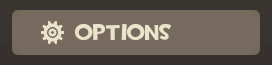
First things first, Press ESC on your keyboard and press the “OPTIONS” button:

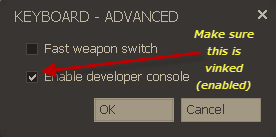
After that, click the “Advanced” button, like the example below:

From there, “enable developer console” make sure there’s it’s enabled.

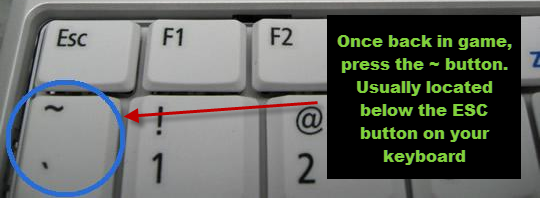
When you’ve done that, close down the menu and go back in-game.

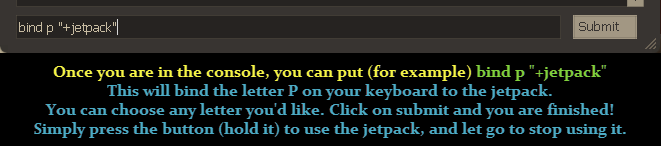
And as last! Once you’ve pressed ~, you should see the console. From there, type in:

Read More

[Mann Co] Trade Server Public Commands

These are the commands you can use within our trading servers. Type them in chat in order to use them:

Server Information Commands
– !admins or /admins – Shows the list of all the admins.
– !scrapbank or /scrapbank – Shows what exactly scrapbanking is and how to do it.

Player Commands
– !jetpack or /jetpack – Shows you how to use the jetpack!
– !monoculus or /monoculus – All the information about the monoculus. (the eye boss)
– !adminrequest or /adminrequest – Want to be an admin?
– !rtd – Roll the Dice. Can be used every 120 seconds. A surprise happens!

Special Map Feature Commands:
– !raffle or /raffle – Shows information how the server raffle works and how to get there.
– !secrets or /secrets – Shows the current map history information.
– !history or /history – Shows the current map history information.

—> Some of these commands may not be working yet! So if it doesn’t work, it’s not added yet.

Read More

[Mann Co] Scrap Banking – What is it?

What is scrap banking?
Let’s say, you found a sandvich & a jag. You may already have these 2 weapons, or your just desperate
for a scrap, but wait, you can’t craft these 2 items into a scrap can you? They are 2 weapons from 2
different classes, and that is where a scrap banker saves the day. The scrap bankers role is to pretty
much take those 2 weapons & give you a scrap in return. Equal Trading.

How can I scrap bank myself?
Well, you will obvious need a scrap, or maybe more. Join a trade server, and type something such as :
Scrap Banking (x Scrap Left!) where x = amount of scrap you have, but you do not need to include that.
Once you have typed that in, use CTRL + A and then use CTRL + C, then CTRL + V to paste it. Paste this
every maybe 30 seconds or every minute. But another way would be to bind something you would like to say
to a key.

How do I bind that then?
You will need the developer’s console, which can be enabled by going to:

Options > Advanced in the KEYBOARD TAB > And check the ‘Enable Developer’s Console’

Click ‘OK’ then ‘Apply’ then ‘OK’.

I’ve done that, now how do I use it?
Well, you need to press the : ` or ~ button on your keyboard, which is under the ESC, above the TAB and
next to the 1 (some keyboards maybe be different) Once you open it type this command bind “o” “say Scrap
Banking!!” whereas “o” will be the key you can press to say what you want to say.

How can I make profit out of this?
Well, you can make quite a lot of metal if you are PATIENT.

Let me say, I have 1 scrap, and I scrap banked, so I now have 2 weapons (Remember to check if they are
CRAFTABLE). Out of those 2 weapons, I am able to sell 1 of those weapons for ATLEAST a piece of scrap.
If I sold both of the weapons I got from the FIRST scrap, I will get TWO SCRAP (or maybe you sold 1 or 2
of those weapons for MORE than a scrap)

You now see ‘I just got 2 scrap from 1 scrap’ Now you may wonder

‘What the heck do I do now?’

Well from here, you can scrap bank AGAIN and repeat the process and keep going on and on. BUT maybe if you
get a weapon from scrap banking, and you have the same weapon in your backpack already, you can craft those
2 weapons together to get a scrap, but I WOULDN’T recommend it. But moving onto the topic, I have 2 scrap
right now, then I scrap banked with both of those scrap and now I have 4 weapons. Now you can sell each of
those weapons for at least a scrap each. Now if you sold those 4 weapons, you will have at least 4 scrap.
Now you can scrap bank AGAIN, and keep repeating this process, or maybe you would like to buy something
you’ve really wanted, or maybe you see something go for a low price.

Read More

[Mann Co.] TF2Lottery.com Trade Server

Here’s our official [Mann Co.] Trade Server with special map features:


The server IP is: 212.187.209.84:27015

Using the modified Trade Stockmarket Beta map, creating our own special design. The map is still in beta, and many things will still be added, changes and improved. You can see a small preview of the map with the images below.

The trade server contains:

All 3 Bosses
– Monoculus Arena
– Merasmus Arena
– Horseless Headless Horsemann Boss

Extra’s
– Pool + Puzzles included!
– More to come.

Read More

[Mann co] Trade Server Administrators

These are the current server administrators. For any complaints, feel free to make a post on http://forum.tf2lottery.com

Root Administrator
Steamprofile badge by Steamprofile.com

Senior Administrator
Steamprofile badge by Steamprofile.com

Co-Administrator
Steamprofile badge by Steamprofile.com

Normal Server Administrators
Yet to be added

Read More